What Sauver Does
Sauver is a cyber-defense layer for Gmail. It strips tracking pixels, identifies recruiter, sales, and investor "slop," and wastes spammers' time with automated traps. It runs inside Claude Code and Gemini CLI via a local MCP server — no background daemons, no cloud services of its own, no API keys.
Tracker Shield
Strips 1×1 tracking pixels and surveillance beacons from HTML emails before they phone home.
Slop Detection
AI classification separates genuine human outreach from automated recruiter and sales templates.
Expert-Domain Trap
Fires hyper-specific technical questions at recruiter bots to shift the cognitive load back to the sender.
Due Diligence Loop
Buries unsolicited investors in bureaucratic document requests and compliance questions.
Bouncer Reply
Engages generic spammers with absurd, impossible requirements to drain their time and resources.
NDA Trap
When a sender repeats the same pitch 3+ times, Sauver sends them a Nondisclosure Agreement to sign before any further communication.
Bot Detection
Detects near-instant replies across consecutive exchanges and silently archives bot-driven threads (configurable threshold).
Three-Minute Setup
One command is all you need. The installer automates every step — no OAuth setup, no API keys, no gcloud. The only prerequisite is Node.js v18+.
Run the installer
Enable Apps Script API & authenticate
The installer will prompt you with a link to enable the Apps Script API in your Google account (a one-time toggle). It then opens a browser window for you to authenticate securely with your Google account.
No third-party OAuth, no service accounts. The Apps Script runs as you inside your own Google account, using the same Gmail APIs Gmail itself uses.
Auto-deploy the backend
The installer uses clasp to create, configure, and deploy the Google Apps Script backend automatically. No manual steps in the Apps Script editor.
Connect your AI client
The installer registers the local MCP server and writes global slash command shims for both Claude Code and Gemini CLI. Commands are available immediately in every session, from any directory.
Claude Code
- MCP server →
~/.claude/settings.json - Slash commands →
~/.claude/commands/
Gemini CLI
- MCP server →
~/.gemini/settings.json - Slash commands →
~/.agent/workflows/
Slash Commands
All six commands work identically in both Claude Code and Gemini CLI, from any working directory. You can also ask in plain English — e.g. "Sauver, triage my last 10 unread emails" or "Archive this thread under the Sauver label".
/sauverFull triage — scans inbox, strips trackers, classifies intent, and drafts or sends counter-measures./tracker-shieldStrip tracking pixels and spy-links from a specific email./slop-detectorClassify recruiter/sales slop and reply with the Expert-Domain Trap./investor-trapClassify investor slop and reply with the Due Diligence Loop./bouncer-replyReply to generic spam with the Time-Sink Trap./archiverLabel and archive a specific thread on demand, without full triage./sauver is the full orchestrator — it runs the complete pipeline. Use the individual commands when you want to target a specific email or action without running the full inbox scan.
Config Reference
Settings live in ~/.sauver/config.json under the preferences key. You can edit the file directly, or simply ask your AI client — e.g. "turn on yolo mode" or "treat job offers as slop".
auto_drafttrueAutomatically create draft replies to slopyolo_modefalseAuto-send replies (use with caution)treat_job_offers_as_sloptrueTrigger Expert-Domain Trap for recruiterstreat_unsolicited_investors_as_sloptrueTrigger Due Diligence Loop for investorssauver_label"Sauver"Gmail label applied when archivingengage_botsfalseKeep engaging threads flagged as bot-like; if false, silently archive thembot_reply_threshold_seconds120Seconds between replies below which a sender is considered bot-likeyolo_modeautomatically sends counter-measure replies without draft review. Use only if you're confident in Sauver's classifications — misclassification of a legitimate email could send an unintended response.
How It Works
Sauver has three layers. The defense logic — tracker detection, slop classification, trap generation — runs entirely inside the AI model. The MCP server and Apps Script are pure data pipes.
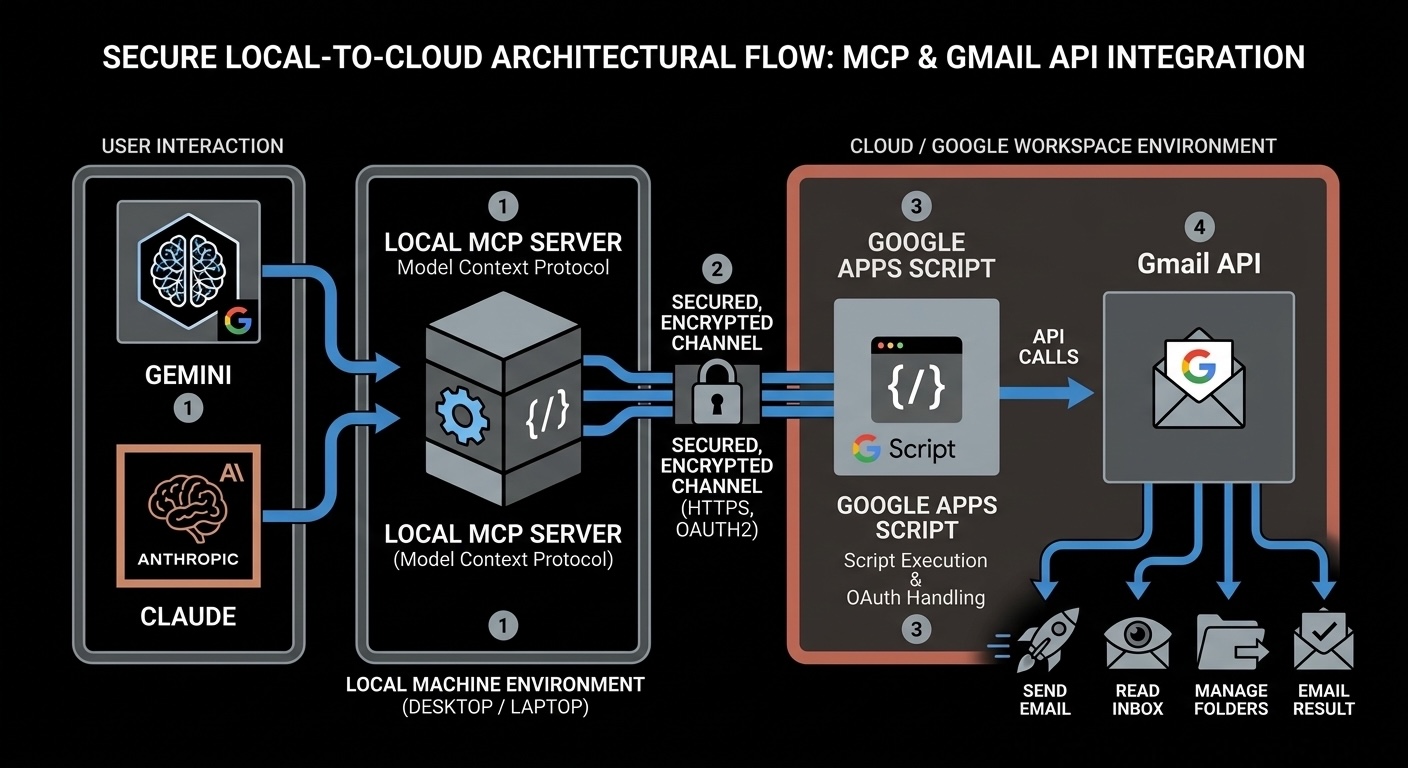
Deployed to your Google account. Native Gmail access via GmailApp — no OAuth tokens, no service accounts. Exposes 9 Gmail actions over HTTPS.
A small Node.js process at ~/.sauver/mcp-server/. Translates MCP tool calls → Apps Script HTTPS POSTs. Reads config from ~/.sauver/config.json.
Reads skill files from ~/.sauver/skills/. Defense logic runs in the model.
Reads skill files from ~/.sauver/skills/. Defense logic runs in the model.
Layer 1 — Google Apps Script
apps-script/Code.gs is deployed as a Web App inside your own Google account. Because it runs as you, it has full native Gmail access — the same APIs Gmail itself uses. The Web App accepts HTTPS POST requests and routes them to one of nine actions:
scan_inboxList unread inbox emailssearch_messagesSearch with a Gmail query stringget_messageFetch full email content by IDcreate_draftCreate a new draft or a reply draftsend_messageSend a reply immediatelyarchive_threadRemove from Inbox and mark readapply_labelApply a label (creates it if missing)get_profileGet the user's email and display namelist_labelsList all Gmail labelsLayer 2 — Local MCP Server
mcp-server/index.js is a small Node.js process that runs on your machine. It speaks the Model Context Protocol (MCP) over stdio, which is how Claude Code and Gemini CLI discover and call tools.
When Claude or Gemini calls a tool, the MCP server either handles it locally (for get_preferences and set_preference, which read/write ~/.sauver/config.json) or forwards it as an HTTPS POST to the Apps Script Web App and returns the result.
Layer 3 — AI Clients
Both Claude Code and Gemini CLI connect to the same local MCP server and see the same 11 tools. The defense logic — tracker detection, slop classification, trap generation — runs entirely inside the AI model, guided by the skill files installed to ~/.sauver/skills/. No defense logic lives in the MCP server or the Apps Script; they are pure data pipes.
Security Model
Secret Key
A 64-character random hex string generated locally during install. It never leaves your machine except in the POST body to your own Apps Script — never sent to Anthropic, Google, or any third party.
File Permissions
The config file ~/.sauver/config.json is created with permissions 600 (readable and writable only by you). It is listed in .gitignore so it can never be accidentally committed.
Apps Script Isolation
The Apps Script runs under your Google account and is not accessible to anyone without the secret key. The URL alone is useless without the correct key.
Email Privacy
Email content is read by the AI model on your local machine. It is not stored or sent anywhere beyond what your AI client (Claude/Gemini) already handles.
To revoke access at any time: In the Apps Script editor, click Deploy → Manage deployments, then delete the deployment. The Web App goes offline instantly. Or run the uninstaller.
Skill Auto-Updates
The MCP server checks for updates automatically in the background on each startup, at most once per day. If a newer version is available, it silently downloads the updated skill files to ~/.sauver/skills/ and rewrites the command shims, then prints a one-line message to restart your AI client.
The check is fire-and-forget — it never delays MCP server startup, and any network failure is silently ignored.
Skill auto-updates cover the skill files and command shims only. To update the MCP server itself or the Apps Script backend, re-run the installer:
Frequently Asked Questions
No. Google Apps Script runs inside your Google account for free. The installer requires only a browser and Node.js v18+.
Email content is read by the AI model (Claude or Gemini) running on your machine as part of the conversation. It is subject to the same privacy terms as any other message you send to your AI assistant — not to any additional service.
It means the Apps Script Web App URL is publicly reachable — but the secret key acts as a password. Any request without the correct key is immediately rejected. The URL alone is useless without the key.
Yes. In the Apps Script editor, click Deploy → Manage deployments, then delete the deployment. The Web App goes offline instantly.
The key lives in ~/.sauver/config.json with permissions 600 (readable and writable only by you). It is listed in .gitignore and is transmitted only over HTTPS directly to your own Apps Script — never to Anthropic, Google, or any third party.
Run the installer again. It generates a new key, redeploys the backend, and updates your local config automatically.
Yes — send_message is fully available in both Claude Code and Gemini CLI.
Yes. Run the installer on each machine. Use the same Apps Script Web App URL, but generate a new secret key per machine (or re-use the same key by copying ~/.sauver/config.json).
Yes, as long as your organization allows Apps Script Web Apps. Some Workspace admins restrict external deployments — check with your IT team if the deployment step fails.
Skill files update automatically — the MCP server checks GitHub once a day at startup and silently installs any newer version. To update the MCP server itself or the Apps Script backend, re-run the installer.
Remove Sauver
Run the uninstaller to cleanly remove everything Sauver added to your machine:
The uninstaller removes:
~/.sauver/Config, MCP server, and skill files~/.claude/commands/Claude Code slash command shims~/.agent/workflows/Gemini CLI slash command shims~/.claude/settings.jsonSauver MCP entry (other settings untouched)~/.gemini/settings.jsonSauver MCP entry (other settings untouched)Your other AI settings and MCP servers are left completely untouched. The uninstaller only removes entries that Sauver originally added.